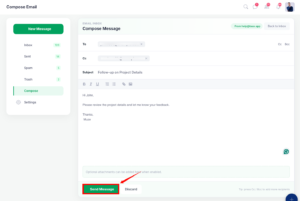
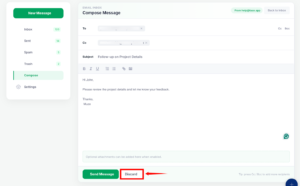
The Compose Email feature in TAAX Pro allows you to write and send outbound emails to clients, tax leads, and business contacts directly from your connected business email address. Whether you need to send follow-up correspondence, request missing tax documents, or update a customer on their filing status, you can handle all outbound communication without leaving the platform.
The compose workspace provides complete control over your message structure, including direct and secondary recipient routing (Cc/Bcc), text styling and formatting tools, clickable hyperlinks, and image insertion.
Compose an Email
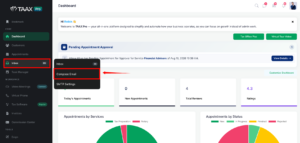
Step 1: Log in to your TAAX Pro portal. From the left sidebar, hover over Inbox and select Compose Email.
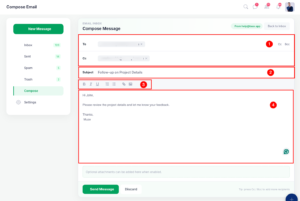
Step 2: The Compose Message interface will appear, allowing you to enter recipients, compose your subject line, and draft your email content.
| Sr. No. | Field | Description |
| 1 | Recipients | Enter the recipient’s email address in the To field. Use Cc or Bcc to add additional recipients when required. |
| 2 | Subject | Enter a brief and relevant subject that clearly indicates the purpose of the email. |
| 3 | Formatting Toolbar | Use the available formatting options to apply bold, italic, and underline formatting, create numbered or bulleted lists, and insert links or images. |
| 4 | Message | Enter the content of the email in the message area. Use paragraphs and the available formatting options to organize the message clearly. |